Audio Equipment Standards
Mixers
Each hall is equipped with a Soundcraft SiExpression digital console. The mixer is configured with a default show called “DECC Default.” Because many congregations use unique shows, each user should expect to begin their session by loading
either the “DECC Default” or their unique show. Churches should not save over the “DECC Default” show.
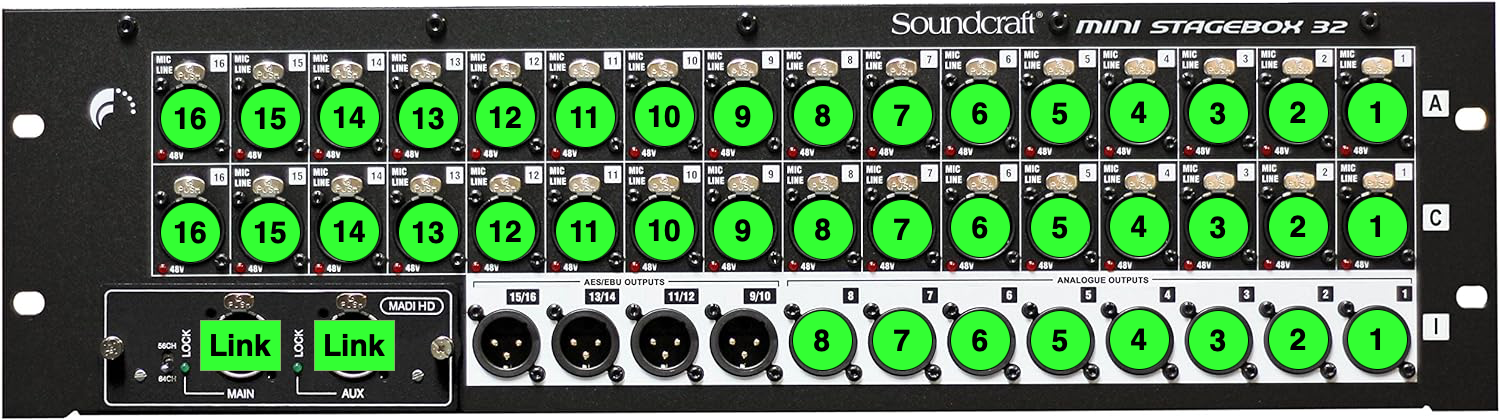
Users should not add or remove cables to the back of the sound board without DECC approval. The standard audio cable configuration for each hall is labeled and described below.
In addition to the audio cable connections each sound board has a C13 power cable, network cable and 2 connections to the MADI add on card (USB B and network cable).
Maranatha Mixer

| Port | Description |
|
Input 1 |
ECCD Wireless Mic 1 |
| Input 2 | ECCD Wireless Mic 2 |
| Input 3 | ECCD Wireless Mic 3 |
| Input 4 | ECCD Wireless Mic 4 |
| Input 5 | ECCD Wireless Mic 5 |
| Input 6 |
ECCD Wireless Mic 6 |
| Line In 3 |
Analog In from Desk 3.5mm |
| Line In 4 |
Analog In from Desk 3.5mm |
| Output 11 | Analog Out to Desk 3.5mm |
| Output 12 | Analog Out to Desk 3.5mm |
| Output 13 | Mothers' Room Mix |
| Output 14 | Mix Mono |
| Output 15 | Main Mix L |
| Output 16 | Main Mix R |
| Link | Stagebox Link |
| USB | PC USB |
| NET | Network |
| PWR | Power |
Emmanuel Mixer
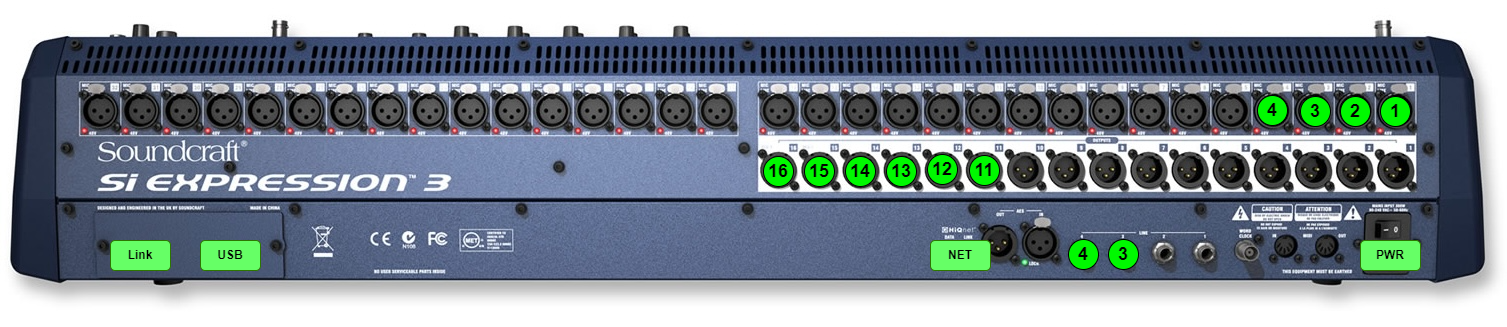
| Port | Description |
|
Input 1 |
ECCD Wireless Mic 1 |
|
Input 2 |
ECCD Wireless Mic 2 |
|
Input 3 |
ECCD Wireless Mic 3 |
|
Input 4 |
ECCD Wireless Mic 4 |
|
Line In 3 |
Analog In from Desk 3.5mm |
|
Line In 4 |
Analog In from Desk 3.5mm |
|
Output 11 |
Analog Out to Desk 3.5mm |
| Output 12 | Analog Out to Desk 3.5mm |
| Output 13 | Mothers' Room Mix |
| Output 14 | Mix Mono |
| Output 15 | Main Mix L |
| Output 16 | Main Mix R |
| Link | Stagebox Link |
| USB | PC USB |
| NET | Network |
| PWR | Power |
Salaam Mixer
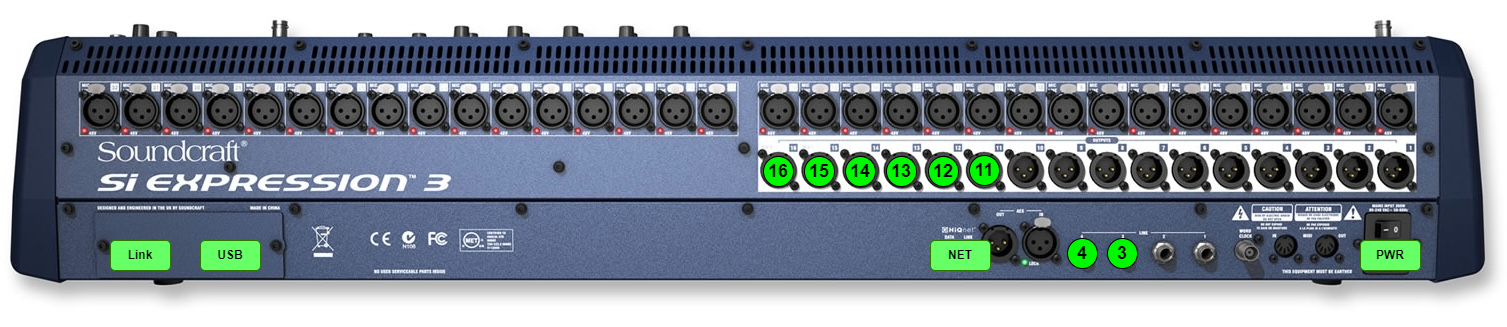
| Port | Description |
| Line In 3 | Analog In from Desk 3.5mm |
| Line In 4 | Analog In from Desk 3.5mm |
| Output 11 | Analog Out to Desk 3.5mm |
| Output 12 | Analog Out to Desk 3.5mm |
| Output 13 | Mothers' Room Mix |
| Output 14 | Mix Mono |
| Output 15 | Mix L |
| Output 16 | Mix R |
| Link | Stagebox Link |
| USB | PC USB |
| NET | Network |
| PWR | Power |
Amplifiers
Amplifier levels have been set to produce strong sound through the system and protect DECC’s shared equipment. Amplifier attenuation levels have been optimized to maximize signal-to-noise ratio and minimize feedback. The standard amplifier settings are shown below and locked by DECC to ensure consistency and sound quality.
| Maranatha | ||||||||
| 1 | 2 | 3 | 4 | 5 | 6 | 7 | 8 | |
| Main Amp | -11 | -11 | -11 | -11 | -11 | -11 | -11 | -11 |
|
Subwoofer Amp |
0 | 0 | 0 | 0 | ||||
|
Monitor Amp |
-12 | -12 | -12 | -12 | -12 | -12 | -12 | -12 |
| Emmanuel & Salaam | ||||||||
| 1 | 2 | 3 | 4 | 5 | 6 | 7 | 8 | |
| Main Amp | -11 | -11 | -11 | -11 | 0 | 0 | ||
|
Monitor Amp |
-9 | -9 | -9 | -9 | -9 | -9 | -9 | -9 |
Stage Snake Connections
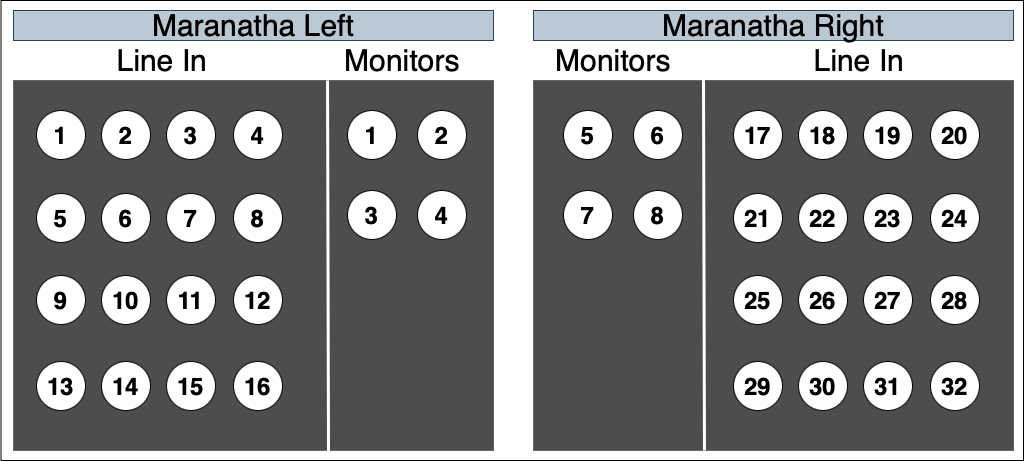
Each hall has a left and right stage snake connector, each with 16 input channels and 4 monitor outputs. All sound inputs should be connected through these snakes. The monitor cables are labeled and should not be removed.
Snake Connections
Stage Rack Panel
Each hall’s stage has a Soundcraft Mini Stagebox32 rack with connections from the snake cables to the sound board. These are labeled and users should not remove, change, or add cables without getting approval from the DECC Administrator.
If your congregation uses in-ear monitors or has any other reason to connect anything directly to this rack, please first obtain approval from the DECC Administrator.