
Connecting - iOS
Connecting to the Guest Network
If you have previously connected to the network and are connecting using different or updated credentials you will need to forget the network and re-connect (Tap the circles 'i' to the right of the network in the list, scroll down to 'Forget this network').
- Go to Settings -> WiFi
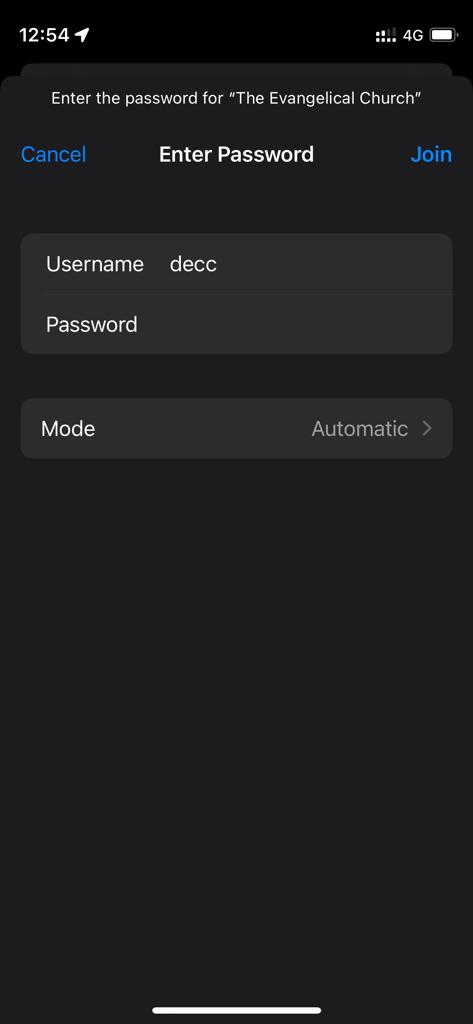
- Tap the network "The Evangelical Church"
- Set the following settings:
- Username: Provided guest username
- Password: Provided guest password
- Mode: Automatic
- Tap 'Join'
- The trust page will vary depending whether you have installed the DECC network certificate (see above). Check the certificate screen and tap 'Trust' to continue to connect.
 |
 |
Optional - DECC Network Certificate
The following is reccomended for your security but is not required for accessing the guest network:
Certificate Explaination
The main building network "The Evangelical Church" uses a public key infrastructure to identify itself and authenticate non-guest clients. It is possible to install the public certificate of the DECC network to a device so the connecting device can confirm the identity of the DECC network. This can prevent devices connecting to rogue wifi networks maliciously created with the same name in other locations (evil twins).
This certificate does not allow DECC access to a device and solely allows your device to confirm that the wireless network you're connecting to is the real "The Evangelical Church". This is reccomended for your device security but is optional and does not affect the security of the traffic between your device and the internet on the real network.
The DECC network certificate (TEC.crt) with expiry 31/12/2050 has the following hashes:
- SHA1: f30ef43af815df6d5e6aa2f8741173deeaba4027
- SHA256: 643aab806ba0051afaca57dea5097d5c66982af552a1b1bb0b85a5f0d953d97b
The certificate is available here: https://decc.me/network